
Automating Sales & CRM with Zoho and Make.com
Introduction
In today’s fast-moving business world, speed and accuracy define success in sales. Yet many teams still waste hours manually updating CRM records, tracking leads, or sending follow-ups. These time-consuming tasks slow down the sales process and make it hard to focus on what truly matters building relationships and closing deals.
This is where automation with Zoho CRM and Make.com can make a dramatic difference. At Luhy.ai, we help businesses automate their sales workflows, from lead generation to post-sale nurturing, ensuring that no opportunity is missed and every customer interaction is perfectly timed.
The Power of Automating Zoho CRM
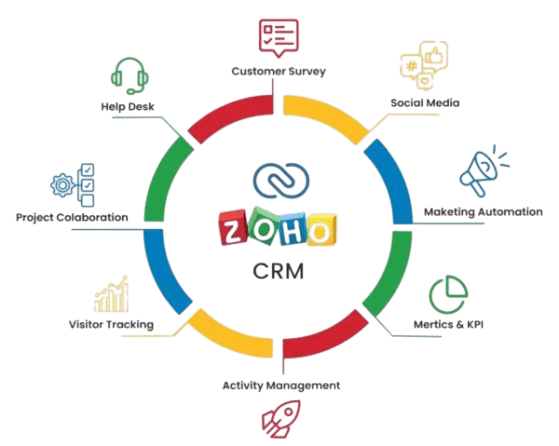
Zoho CRM is one of the most powerful customer relationship management tools available today. It helps businesses manage leads, deals, contacts, and communication in one place. However, to get the most out of Zoho, automation is key.
By connecting Zoho CRM with Make.com a leading no-code automation platform businesses can integrate their CRM with hundreds of other tools, ensuring every part of the sales process runs automatically.
Here’s what automation can do:
Instantly capture leads from web forms, ads, or emails.
Automatically assign leads to the right sales reps.
Send personalized follow-up messages.
Update records across multiple platforms without manual input.
Generate reports and performance insights in real time.
Common Sales Challenges Without Automation
Even with a CRM in place, many businesses face similar pain points:
- Leads from websites or ads are entered manually.
- Reps forget to follow up on time.
- Customer data is inconsistent across systems.
- Managers struggle to get real-time insights into the sales pipeline.
These problems don’t just slow down operations they lead to missed opportunities and lost revenue.
How Make.com Enhances Zoho CRM
Make.com acts as the bridge between Zoho CRM and your other business tools such as Gmail, Slack, ClickUp, Google Sheets, SmartSuite, or even your website forms.
Through visual, drag-and-drop workflows, Luhy.ai designs automated processes that work 24/7, keeping your CRM updated and your sales team focused on selling.
Here’s how automation works in action:
Lead Capture Automation
When a visitor submits a contact form on your website, Make.com instantly sends the data to Zoho CRM.
A new lead is created and assigned to a sales representative based on predefined criteria (region, product type, or availability).
Follow-Up Automation
Make.com triggers an email or SMS follow-up automatically ensuring every lead is contacted within minutes.
If no response is received, it schedules a reminder task in ClickUp or SmartSuite.
Deal Stage Updates
When a deal progresses in Zoho CRM, Make.com can notify the team in Slack, update a dashboard, or even create a new invoice in Zoho Books automatically.
Customer Retention Automation
After a deal is won, Make.com can trigger workflows to add the customer to a “Loyalty” list, send a thank-you email, and log the details in SmartSuite for future engagement.
Why Businesses Trust Luhy.ai for Zoho & Make.com Automation
At Luhy.ai, we understand that no two sales processes are the same. That’s why we design custom automation workflows that align perfectly with your sales cycle and business objectives.
Here’s how we make automation seamless:
Audit & Analysis: We analyze your existing sales process and identify repetitive tasks.
Custom Workflow Design: We create Make.com scenarios that automate those tasks inside and outside Zoho CRM.
Testing & Quality Assurance: Every automation is tested for accuracy, reliability, and speed.
Training & Support: Your team gets the know-how to manage and expand automations independently.
Continuous Optimization: We monitor and fine-tune your workflows as your business grows.
Our goal is simple to make your Zoho CRM work smarter, not harder.
Example: A Real-World Use Case
Let’s say your company runs marketing campaigns on Facebook and collects leads via a form. Traditionally, your team might manually import those leads into Zoho CRM and send follow-ups later.
With Luhy.ai’s automation setup:
Make.com automatically fetches new Facebook leads in real time.
It creates or updates the lead record in Zoho CRM.
The system sends an instant “Thank you for your interest” email to the lead.
A ClickUp task is generated for the sales rep to make a follow-up call.
If the deal closes, SmartSuite logs the client data for onboarding.
This process runs automatically, ensuring faster responses, higher conversions, and a more productive sales team.
The Benefits of Zoho & Make.com Automation
When your sales process runs on autopilot, you gain:
Higher lead conversion rates: Respond to prospects instantly.
Consistent communication: No follow-up is ever missed.
Accurate, unified data: CRM stays up to date across all platforms.
Increased productivity: Sales teams focus on customers, not admin tasks.
Actionable insights : Automated dashboards and reports show real-time progress.
Automation is the foundation of modern sales success. By connecting Zoho CRM with Make.com, your business can eliminate repetitive tasks, close deals faster, and deliver a seamless customer experience.
At Luhy.ai, we help companies like yours implement powerful Zoho and Make.com automations that transform everyday operations into efficient, data-driven workflows.
Let’s automate your sales pipeline today.
Partner with Luhy.ai to streamline your CRM processes, increase productivity, and unlock the full potential of automation.